
Hi All, today I will be writing about another important aspect of Solr that addresses the needs of many business applications — Solr Nested Documents. Suppose we need to index data for an e-commerce company that hosts a variety of products on its website along with associated SKUs. This data must be indexed, updated, and searched efficiently in a way that is meaningful for both end users and merchandisers. A natural question arises: how should this data be represented, and what approach should be followed to manage it effectively while maintaining scalability and search performance?
Introduction to Nested Documents in Search Engines
Modern search applications rarely deal with simple, flat datasets. Industries such as e-commerce, healthcare, logistics, travel, and digital marketplaces often manage information that exists in hierarchical relationships. A product may have multiple variants, an order may contain several items, or a customer profile may include numerous transactions. Representing such interconnected data efficiently becomes a challenge when using traditional document indexing approaches.
Search engines like Solr and Lucene are optimized for storing and retrieving documents quickly. However, treating every related entity as an independent document can create issues during querying, filtering, faceting, and relevance ranking. For example, an e-commerce product with multiple SKUs stored as separate records may produce duplicate results or inaccurate facets when users search by attributes such as color, size, or material.
Nested documents solve this problem by allowing multiple child documents to be associated with a parent document within a single indexed block. Rather than indexing each SKU independently, Solr groups all related child entities beneath a parent entity, preserving relationships during indexing and querying.
To address this problem, Solr provides us with a mechanism to associate multiple docs with each other and put them in a relationship. Also, it provides both indexing and searching mechanisms to get data in and out. What we are referring to here is called a “Nested document structure”, or more technically, a BLOCK in Solr. Put simply, a block is a set of parent-child relation between multiple documents.
Let’s understand this in two parts.
Indexing Nested Documents
Let’s assume a nested structure as below:
{
“id”:”100″,
“scope_ss”:”product”,
“category_ss”:”OutdoorSofa”,
“productType_ss”:”sofa”,
“_childDocuments_“: [
{
“id”:”101″,
“scope_ss”:”sku”,
“Fabric_ss”:”Polyester”,
“Depth_ss”:”Classic”,
“Finish_ss” : “Fine”,
“Color_ss”:”Grey”},
{
“id”:”102″,
“scope_ss”:”sku”,
“Fabric_ss”:”nylon”,
“Depth_ss”:”Petite”,
“Finish_ss” : “Grey”,
“Color_ss”:”Green”},
{
“id”:”103″,
“scope_ss”:”sku”,
“Fabric_ss”:”acrylic”,
“Depth_ss”:”Petite”,
“Finish_ss” : “Espresso”,
“Color_ss”:”Green”},
{
“id”:”104″,
“scope_ss”:”sku”,
“Fabric_ss”:”Polyester”,
“Depth_ss”: “Classic”,
“Finish_ss” : “Grey”,
“Color_ss”:”Dove”},
{“id”:”105″,
“scope_ss”:”sku”,
“Fabric_ss”:”nylon”,
“Depth_ss”: “Classic”,
“Finish_ss” : “Grey”,
“Color_ss”:”Blue”}]
}
_childDocuments_ tells solr that each object defined within the scope is a child to the doc it belongs to. In essence, we have just created a block of information that has properties for SKU’s which imparts some meaning to the application scenarios. Now let’s see how we can index the doc. Utilizing Solr’s dynamic schema mapping capabilities, we can be certain that all the fields in the document will get indexed and get reflected (Notice _ss in fields, they are stored as String array). Now, one may ask upon careful observation that why the data type used is array when the field is storing String type information. Answer to this question lies in more subtle understanding of inner working of Solr.
When Solr indexes a nested document, it stores all field values for a field in a set. This effectively means each field has multiple values and hence the type, array of String. If one tries to index data without using _ss or just _s (String type in Solr), solr engine throws an error. Now, assuming we have settled with basics, let’s continue to index the data.
Fire up UI and index data by navigating to necessary modalities as below:
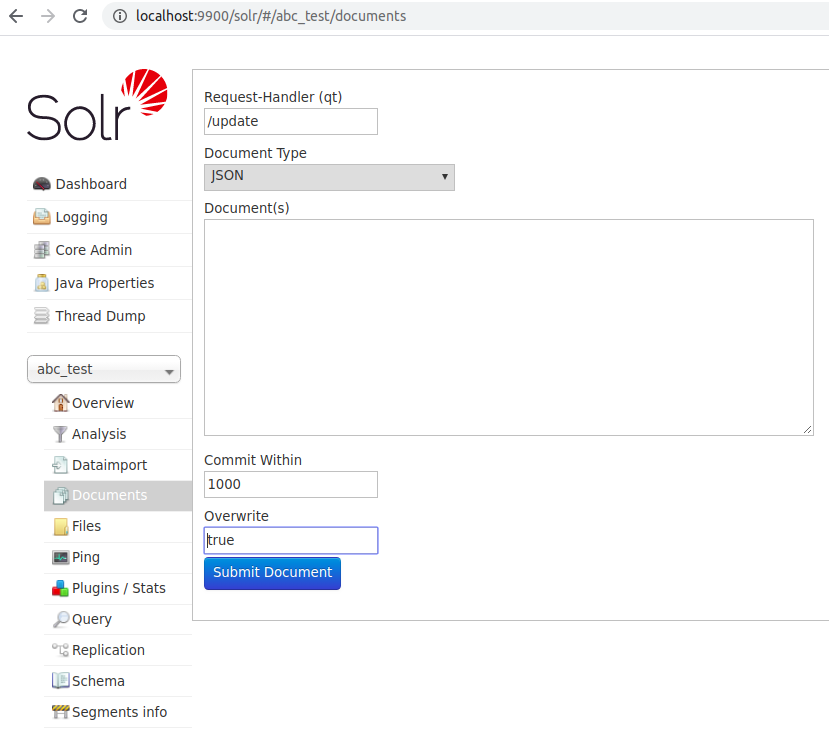
Paste the JSON doc in “Documents(s)” section and index the document. If all configuration is proper, then, the index upon querying will appear as below:
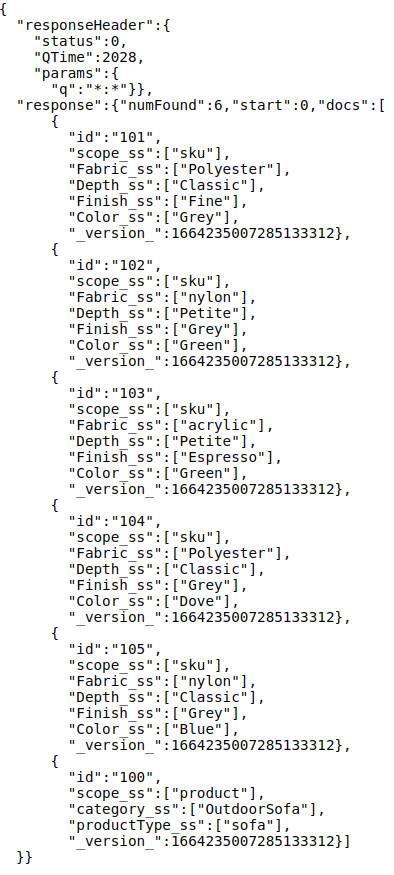
Note: Notice how the parent doc (the product information) is referenced at bottom and child docs are piled upon it. This is not by accident but by design.
Solr 9.x nested document updates
## Nested Documents in Solr 9.x: What Changed?
Solr 9.x introduced improvements in nested document handling, memory efficiency, and query execution for block joins. Compared to older Solr versions, nested indexing now performs better with large SKU catalogs and deep parent-child hierarchies.
Key enhancements include:
• Improved block join query execution
• Better heap utilization during indexing
• Faster JSON Facet API performance
• Optimized update handling for nested documents
• Reduced latency for large product catalogs
Businesses handling millions of SKUs can observe noticeable improvements in search throughput and indexing speed after migrating to Solr 9.x.
Querying Nested Documents
Let’s dive into basics of querying nested docs in Solr.
One of the most needed use-case in context of e-commerce data-set is Faceting. Faceting for nested docs by design is different than traditional docs in Solr.
- To understand this, let’s generate facets for Color_ss and Fabric_ss fields.
- Query Syntax: &json.facet={Fabrics:{type:terms,field:Fabric_ss,limit:-1},Colors:{type:terms,field:Color_ss,limit:-1}}&rows=0
- Response:
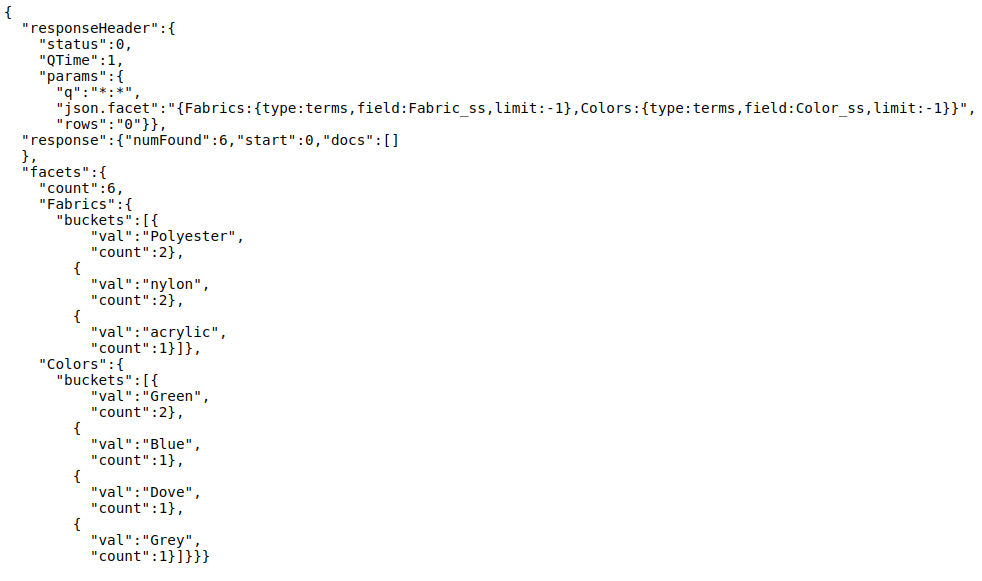
If one observes carefully, one can see clearly how two buckets for each of the fields is formed. First bucket for Fabrics and second bucket for colors. Its worth mentioning here that the name, “Fabrics” and “Colors” are custom headers and can be changed at will.
- Lets try something else. Let’s try nested faceting here.
- Query: &json.facet={Fabrics:{type:terms,field:Fabric_ss,limit:-1,facet:{Colors:{type:terms,field:Color_ss,limit:-1}}}}&rows=0
- Response:
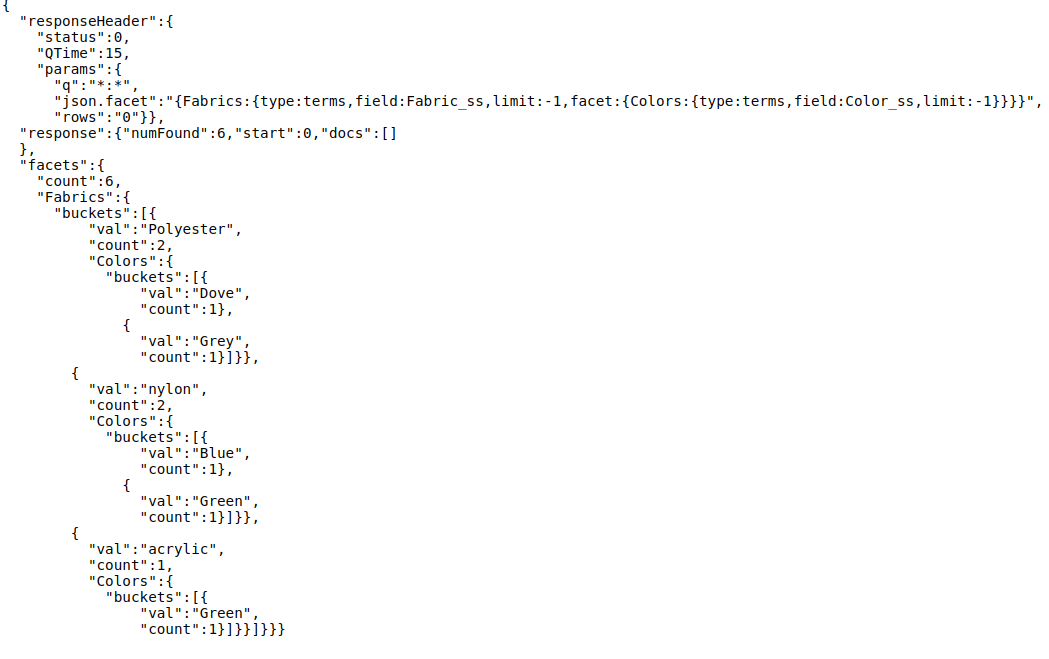
Here, we have a bucket called “Fabrics” and nested within it is another bucket called “Colors”. In essence, we are presented with more granular information telling the color of each fabric type.
Let’s try another interesting query, one combining nested faceting with independent buckets.
- Query: &json.facet={Depth:{type:terms,field:Depth_ss,limit:-1},Fabrics:{type:terms,field:Fabric_ss,limit:-1,facet:{Colors:{type:terms,field:Color_ss,limit:-1}}}}&rows=0
- Response:
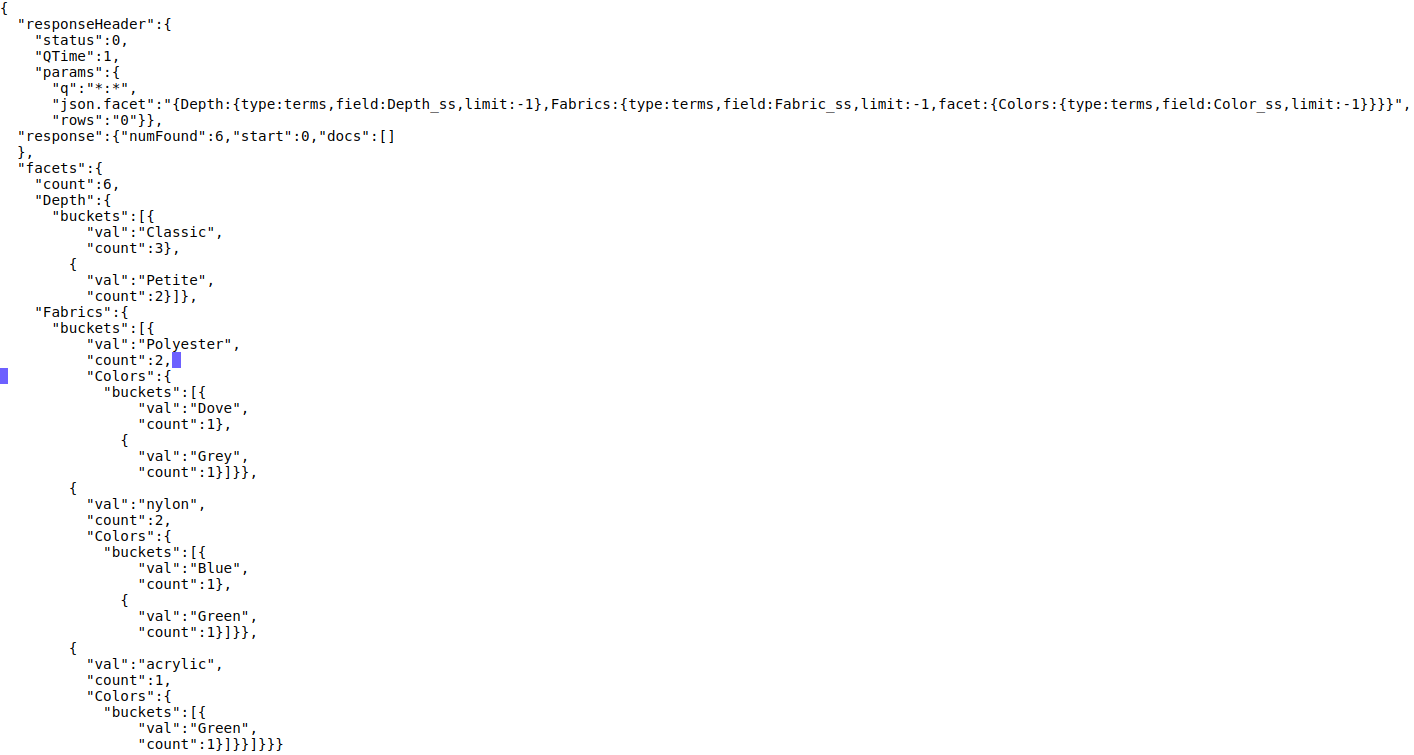
Here, as one observes carefully, one bucket stands for independent Depth and other stands for nested facet for Fabric with Color. This enables businesses using Solr to present product information at a granular level for their customers.
Some other useful queries include:
- To view all products and SKU information:
- Query: q=*:*&rows=10
- Response:
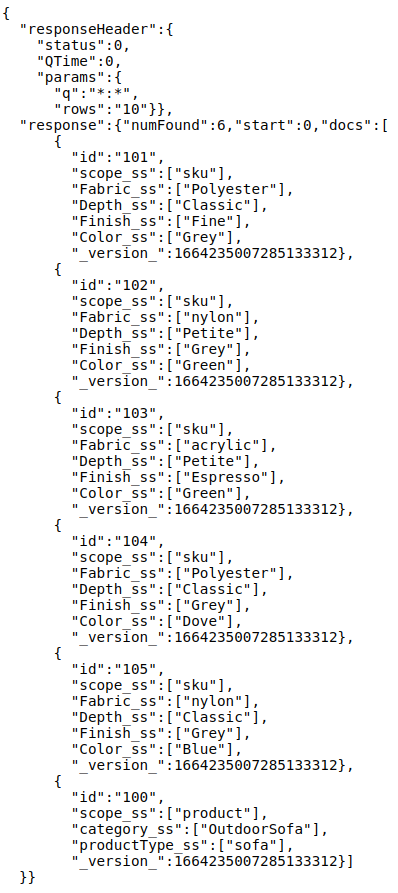
- To fetch specific products and its associated SKUs:
- Query: q={!child%20of=”scope_ss:product”}id:100&wt=json
- Response:
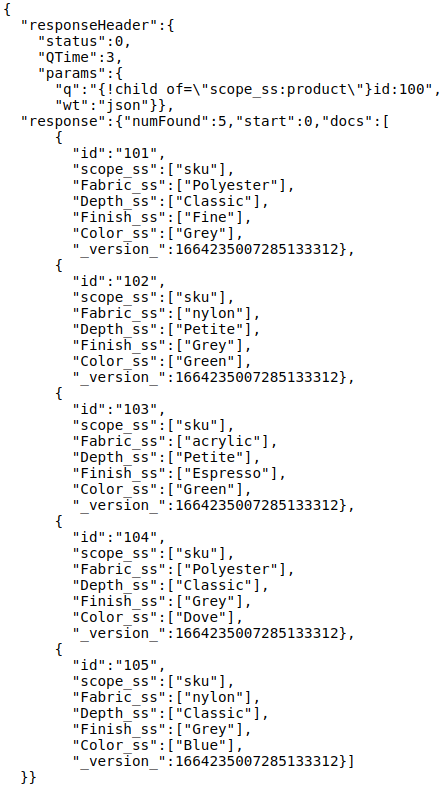
{!child%20of=”scope_ss:product”} – This filter fetches information for all parent products by using the unique field-value pair used to identify a parent doc in index.
id:100 – This filter fetches “some” parents based on a specific field-value pair for a parent doc.
Block Join Query Examples
## Advanced Querying Using Block Join Queries
Solr provides parent and child query parsers for traversing nested structures.
### Fetch parent products based on child SKU attributes
Example:
Query:
q={!parent which=”scope_ss:product”}Color_ss:Green
Result:
Returns parent products containing SKUs where Color = Green.
—
### Fetch child SKUs belonging to specific parent products
Query:
q={!child of=”scope_ss:product”}category_ss:OutdoorSofa
Returns:
All SKU documents belonging to Outdoor Sofa products.
—
### Combined Block Join Query
Query:
q={!parent which=”scope_ss:product”}(Color_ss:Green AND Fabric_ss:nylon)
Use Case:
Show products having Green-colored nylon variants.
Performance Benchmark Section
## Performance Considerations for Nested Documents
Nested documents improve data modeling but can impact indexing speed.
Sample benchmark (illustrative):
Dataset:
100K Products
500K SKU documents
Environment:
8 GB Heap
Solr 9.x
SSD Storage
Observed metrics:
Flat documents indexing:
≈ 18K docs/sec
Nested documents indexing:
≈ 10K docs/sec
Block Join query latency:
40–120 ms
JSON Faceting:
50–200 ms
Update operations:
Higher cost due to complete block reindexing
Takeaway:
Nested structures improve query flexibility but increase update overhead. Designing block sizes carefully is important for e-commerce deployments.
Updating a nested document in Solr
Updating a nested document in Solr involves is a very tricky business. One has to update a complete BLOCK if a single SKU has to be updated or a new SKU has to be added. (THIS IS THE ONLY LIMITATION OF SOLR). This essentially happens because of underlying Lucene handlers. Exact explanation for this, though present, is beyond the scope of this post.
Deleting a SKU/child document
The solr document is a little ambiguous about it though based on a simple POC, its clear that one can remove a child doc from solr by using a simple delete by ID API. One can invoke update handler for core/collection as below:
Query: update?stream.body=<delete><query>id:101</query></delete>&commit=true
Response: This removes the child document with id:101 from index
So, that’s it for today. Will be back with another interesting post on Solr.
Cross-link to Circuit Breakers Solr post
## Final Thoughts
Nested documents provide a powerful mechanism for representing product-SKU relationships in Solr. While they improve search relevance and faceting capabilities, update operations remain costly because complete blocks must be rewritten.
When deploying nested structures at enterprise scale, memory tuning and cluster protection become equally important.
You may also explore:
“Understanding Circuit Breakers in Solr for High Traffic Search Systems”
This complements nested indexing strategies by preventing node failures during expensive queries and indexing spikes.
Conclusion
Nested documents in Solr provide a powerful way to model complex parent-child relationships, making them highly suitable for e-commerce platforms, inventory systems, product catalogs, and applications that require granular search experiences. Features such as block indexing, JSON faceting, and block join queries enable businesses to deliver richer search capabilities while maintaining meaningful relationships between products and associated entities like SKUs.
At AeoLogic Technologies, we work on building scalable search, AI, and enterprise solutions that help organizations manage complex data structures efficiently. Leveraging technologies such as Solr for intelligent search and indexing allows businesses to improve product discoverability, enhance operational efficiency, and create faster, more personalized user experiences.
FAQs
Q1. How do you index nested documents in Solr?
Nested documents in Solr are indexed using the _childDocuments_ field, which allows multiple child documents to be associated with a parent document in a single block. Parent-child relationships are stored together during indexing, enabling efficient querying and faceting across related records. For example, an e-commerce product can act as a parent document while individual SKUs, variants, or attributes are indexed as child documents.
Q2. What is block join in Apache Solr?
Block join in Apache Solr is a querying mechanism used to retrieve parent documents based on child document conditions or fetch child documents from matching parent records. It enables searches across nested document structures using special query parsers such as {!parent} and {!child}. Block joins are commonly used in product catalogs where users search for products using SKU-level attributes like size, color, or material.
Q3. How does Solr handle parent-child documents?
Solr stores parent and child documents as a single indexed block using Lucene’s nested document architecture. The parent document typically contains high-level information, while child documents store related details such as product variants or metadata. During updates, Solr generally reindexes the entire block because parent-child records are internally linked within the same segment.
Q4. Is Solr better than Elasticsearch for nested documents?
Solr and Elasticsearch both support nested documents, but their approaches differ. Solr provides strong support for block joins, JSON faceting, and complex parent-child relationships, making it effective for large catalog-based applications. Elasticsearch offers nested and parent-child mappings with flexible distributed search capabilities. The better option depends on workload requirements, update frequency, indexing patterns, and query complexity.
Q5. How to query nested documents in Solr?
Nested documents in Solr can be queried using block join parsers and standard query syntax. For example:
Parent query based on child attributes:
q={!parent which="scope_ss:product"}Color_ss:GreenChild query from parent documents:
q={!child of="scope_ss:product"}id:100These queries help retrieve products, SKUs, and related nested information efficiently while preserving parent-child relationships.

Manoj Kumar is a seasoned Digital Marketing Manager and passionate Tech Blogger with deep expertise in SEO, AI trends, and emerging digital technologies. He writes about innovative solutions that drive growth and transformation across industry.
Featured on – YOURSTORY | TECHSLING | ELEARNINGINDUSTRY | DATASCIENCECENTRAL | TIMESOFINDIA | MEDIUM | DATAFLOQ