
Smart homes are no longer science fiction — they’re the norm. In 2026, a growing share of new-build homes ship with at least one connected device pre-installed, and existing homeowners are retrofitting everything from door locks to dishwashers with smart controls. But choosing the best smart home automation system is harder than it sounds. Dozens of brands, several competing wireless standards, and price points ranging from under $100 to well over $10,000 make it easy to end up with a pile of gadgets that never talk to each other.
This guide breaks down exactly what a home automation system is, how it works, which systems are worth buying in 2026, and how to build one step by step — whether you’re automating a single room or an entire property.
What Is a Smart Home Automation System?
|
Quick answer A smart home automation system is a network of connected devices — lights, thermostats, locks, cameras, and appliances — that can be controlled remotely or set to act automatically based on schedules, sensors, or voice commands, usually through a central hub or smartphone app. |
Unlike a single smart gadget (say, one smart bulb controlled from its own app), a true home automation system connects multiple devices under one “brain,” so they can trigger each other. A motion sensor can tell the lights to turn on, which can tell the thermostat that someone is home, which can tell the security system to disarm — all without you touching a screen. That connected, rule-based behavior is what separates automation from simple remote control.
How Home Automation Systems Work
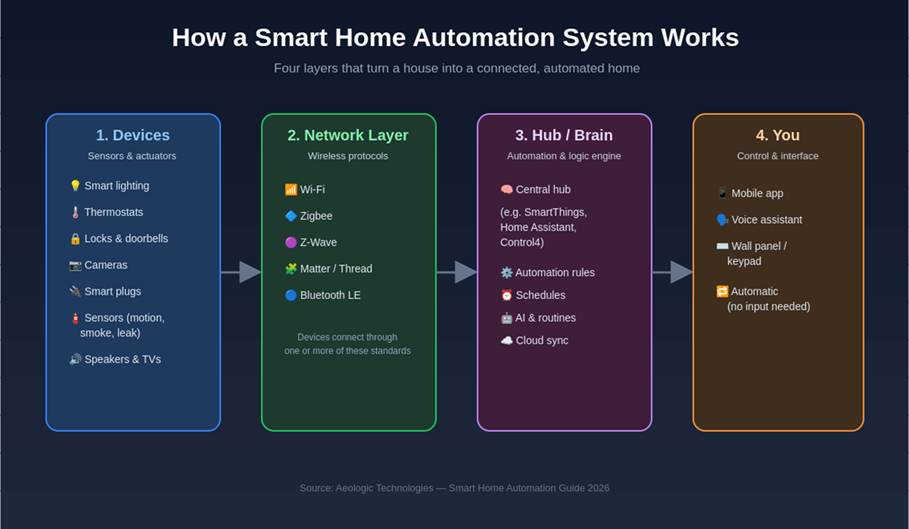
Every home automation setup — from a single smart plug to a whole-house installation — is built from the same four layers.
The four core components
- Devices: the sensors and actuators that do the physical work — smart bulbs, locks, thermostats, plugs, cameras, and sensors (motion, smoke, leak, door/window).
- Network layer: the wireless protocol that lets devices talk to the hub and to each other.
- Hub / brain: the central controller that stores automation rules, schedules, and routines, and syncs with the cloud and your voice assistant.
- Interface: how you interact with the system — a mobile app, voice assistant, wall panel, or fully automatic triggers that need no input at all.
Wireless protocols explained
Compatibility problems almost always come down to protocol mismatches. Here’s how the major standards compare:
|
Protocol |
Best for |
Range |
Notes |
|
Wi-Fi |
High-bandwidth devices (cameras, TVs) |
Whole home (with router/mesh) |
Easy setup, but can crowd your router with many devices |
|
Zigbee |
Lighting, sensors, low-power devices |
Mesh network — extends with each device |
Needs a hub; very reliable for large device counts |
|
Z-Wave |
Locks, security, whole-home installs |
Mesh network |
Less wireless interference than Zigbee; hub required |
|
Matter / Thread |
Cross-brand compatibility |
Mesh (Thread) + local/cloud (Matter) |
The 2026 industry standard — works across Apple, Google, Amazon & SmartThings |
|
Bluetooth LE |
Simple, single-room devices |
Short range |
No hub needed, but limited automation depth |
If you’re buying new devices in 2026, prioritize products with a Matter badge. Matter is now supported by Amazon, Google, Apple, and Samsung, which means a Matter-certified lock, bulb, or sensor will work with almost any hub you choose later — protecting you from ecosystem lock-in.
Benefits of Whole-Home Automation
Convenience and time savings
Routines replace repetitive manual tasks: one “Good night” command can lock the doors, lower the thermostat, and turn off every light in the house.
Energy efficiency and cost savings
Smart thermostats and occupancy-based lighting adjust automatically to when rooms are actually in use, typically trimming heating, cooling, and lighting waste without any change in comfort.
Enhanced home security
Smart locks, doorbell cameras, and motion sensors work together to alert you in real time and can simulate occupancy while you’re away — a stronger deterrent than a timer-based lamp.
Accessibility and peace of mind
Voice control and automatic routines make homes easier to live in for aging residents or anyone with mobility challenges, from voice-activated lighting to automatic door locks and fall-detection sensors.
The Best Smart Home Automation Systems in 2026 (Compared)
There is no single “best” system for everyone — the right choice depends on the devices you already own, your budget, and whether you want a plug-and-play ecosystem or full local control. Here’s how the leading options compare:
|
System |
Best for |
Protocol support |
Price range |
|
Amazon Alexa / Echo |
Voice-first control, widest device support |
Wi-Fi, Zigbee (select hubs), Matter |
$25–$250 per device |
|
Google Home |
Households already using Android/Google |
Wi-Fi, Thread, Matter |
$30–$230 per device |
|
Apple Home (HomeKit) |
Privacy-focused Apple households |
Wi-Fi, Thread, Matter |
$50–$300 per device (premium hardware) |
|
Samsung SmartThings |
DIY users who want one flexible hub |
Zigbee, Z-Wave, Wi-Fi, Matter |
$70 hub + device costs |
|
Control4 (professional) |
Whole-home, luxury, custom installs |
Proprietary + Zigbee/Z-Wave integrations |
$3,000–$50,000+ installed |
|
Home Assistant (open-source) |
Advanced/DIY users wanting full local control |
Nearly all — Wi-Fi, Zigbee, Z-Wave, Matter, Thread |
Free software; ~$100–$200 hardware |
Amazon Alexa / Echo
Alexa remains the broadest ecosystem by device compatibility, with tens of thousands of certified “Works with Alexa” products. It’s the easiest starting point for households that want voice control without committing to a single hardware brand.
Google Home
Google Home pairs naturally with Android phones and Google Nest hardware, and its Assistant remains among the most accurate for natural-language commands and multi-step routines.
Apple Home (HomeKit)
Apple’s ecosystem processes automation locally on an Apple TV, HomePod, or iPad acting as a hub, which appeals to privacy-conscious buyers, though certified accessories carry a price premium.
Samsung SmartThings
SmartThings is one of the few consumer hubs that natively bridges Zigbee, Z-Wave, and Wi-Fi devices in one app, making it a strong pick for mixed-brand households.
Control4 (professional installation)
For whole-property automation — multi-room audio, lighting scenes, HVAC zoning, and security integrated into one professionally installed system — Control4-style platforms remain the standard for high-end and commercial builds.
Home Assistant (open-source)
For technically confident users, Home Assistant runs entirely on local hardware, supports virtually every protocol and brand, and avoids subscription fees — at the cost of a steeper setup curve.
Types of Smart Home Devices
A complete home automation system is built from six device categories. Start with the ones that solve your biggest daily friction point, then expand.
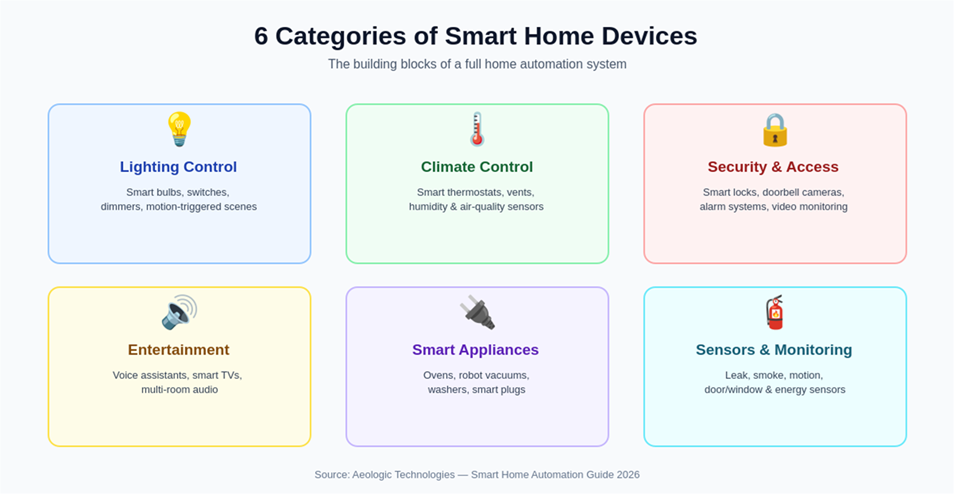
Lighting control
- Smart bulbs and dimmer switches
- Motion-triggered scenes and schedules
- Color-tunable lighting for mood or wake-up routines
Climate control
- Smart thermostats with occupancy sensing
- Smart vents for room-by-room zoning
- Humidity and air-quality monitors
Security and access
- Smart locks and video doorbells
- Indoor/outdoor cameras with AI-based alerts
- Whole-home alarm and monitoring systems
Entertainment
- Voice assistants and smart speakers
- Smart TVs and streaming hubs
- Multi-room audio systems
Smart appliances
- Robot vacuums and mops
- Smart ovens, washers, and refrigerators
- Smart plugs that add automation to non-smart appliances
Sensors and monitoring
- Leak and water-shutoff sensors
- Smoke and carbon-monoxide detectors
- Door, window, and motion sensors
How to Choose the Right System for Your Home
1. Define your goals and budget
Decide what problem you’re solving first — security, energy costs, convenience, or accessibility — rather than buying devices at random. A focused $200 starter kit that solves one real problem beats a scattered $2,000 collection that doesn’t.
2. Check compatibility before you buy
Confirm every device you’re considering supports the ecosystem (Alexa, Google, Apple, SmartThings) or protocol (Matter, Zigbee, Z-Wave) you plan to standardize on. Matter-certified devices offer the most future-proof flexibility.
3. DIY vs. professional installation
Lighting, plugs, and voice assistants are simple enough for DIY setup in an afternoon. Whole-home wiring, structured audio/video, and complex security integrations are usually worth a professional installer, especially for new construction or renovation projects.
How to Set Up Home Automation: Step-by-Step
- Audit your home. List the rooms and tasks you want to automate first — don’t try to do everything at once.
- Choose your ecosystem. Pick a primary hub or voice assistant (Alexa, Google Home, Apple Home, or SmartThings) based on the devices you already own.
- Start with one high-impact category. Lighting and smart plugs are the fastest, cheapest way to see automation in action.
- Add security next. Smart locks and cameras deliver the most noticeable improvement in daily peace of mind.
- Connect a hub for scale. Once you own more than 8–10 devices, a dedicated hub (SmartThings, Home Assistant, or a Matter controller) keeps automations reliable as the network grows.
- Build routines, not just remotes. The real value of automation comes from multi-device routines (“Leaving home,” “Good night,” “Movie time”) — not controlling each device individually from an app.
Home Automation for Businesses and Smart Buildings
The same automation principles — connected sensors, a central control layer, and rule-based routines — scale directly into commercial and industrial settings. Businesses use IoT-driven automation for energy management, predictive maintenance, and building security across offices, warehouses, and factories. If you’re evaluating automation beyond the home, Aeologic’s IoT and industrial automation teams design and implement enterprise-grade connected systems — see the internal linking recommendations in Section 7 for where to connect this article to that service line.
Smart Home Automation Trends to Watch in 2026
- Matter protocol maturity: cross-brand compatibility is now the default expectation, reducing ecosystem lock-in for new buyers.
- AI-driven predictive automation: systems increasingly learn routines and adjust proactively (pre-heating a room before you wake, for example) rather than relying only on fixed schedules.
- Energy-grid integration: smart thermostats and EV chargers are beginning to respond to utility demand-response signals, shifting usage to off-peak hours automatically.
- Privacy-first local processing: more hubs (Apple Home, Home Assistant, and newer SmartThings features) now process automation on-device rather than in the cloud.
Conclusion
The best smart home automation system is the one that matches the ecosystem you already use, solves a real problem in your home, and leaves room to grow — from a single smart plug to a fully integrated, whole-property setup. Start small, prioritize Matter-certified devices for flexibility, and build routines that connect multiple devices rather than controlling them one by one.
Looking to bring the same connected, automated approach to a business, warehouse, or commercial building? Aeologic’s IoT and automation team can help design a system built around your operations — get in touch to talk through your project.
Frequently Asked Questions
What is home automation?
Home automation is the use of connected devices — lighting, thermostats, locks, and sensors — to control or automate household tasks remotely or on a schedule, typically through a smartphone app, voice assistant, or central hub.
What is a smart home automation system?
A smart home automation system is the full network of connected devices, a communication protocol (like Wi-Fi, Zigbee, or Matter), and a central hub or app that lets those devices act automatically based on rules, schedules, or sensor input.
What is the best smart home system in 2026?
There is no single best system for everyone. Amazon Alexa and Google Home offer the widest device compatibility, Apple Home prioritizes privacy and local processing, SmartThings suits mixed-brand DIY setups, and Control4-style platforms suit professionally installed whole-home projects.
What are the main components of a home automation system?
The four core components are: connected devices (sensors and actuators), a wireless network/protocol layer, a central hub that stores automation rules, and a user interface such as a mobile app or voice assistant.
What is a domotic system?
“Domotics” is another term for home automation — the application of electronics and networking to control household functions like lighting, heating, and security automatically.
How much does a full smart home system cost?
A basic starter setup (lighting, a smart speaker, and a plug or two) can cost under $200. A complete whole-home system with security, climate, and entertainment integration typically ranges from $1,500 to $5,000 for DIY installs, and $10,000+ for professionally installed systems like Control4.
Do smart home devices need Wi-Fi to work?
Not always. Devices using Zigbee, Z-Wave, or Thread connect through a hub rather than directly to Wi-Fi, which reduces network congestion and often improves reliability for larger installations.
Is home automation worth it?
For most households, yes — the combination of energy savings, security, and daily convenience typically outweighs setup costs, especially when starting with a focused, high-impact category like lighting or locks rather than automating everything at once.

I’m Deepika Pandey, an SEO strategist and content writer with 6+ years of experience. I create SEO-friendly content that drives traffic and engages readers. I combine data insights with creativity to help businesses grow their online presence effectively.